Tuesday, May 22nd

Last update06:55:00 PM GMT

You are here: Home

MIDI real-time Harmonizer version 3 released

Midi_Harmonizer_V303
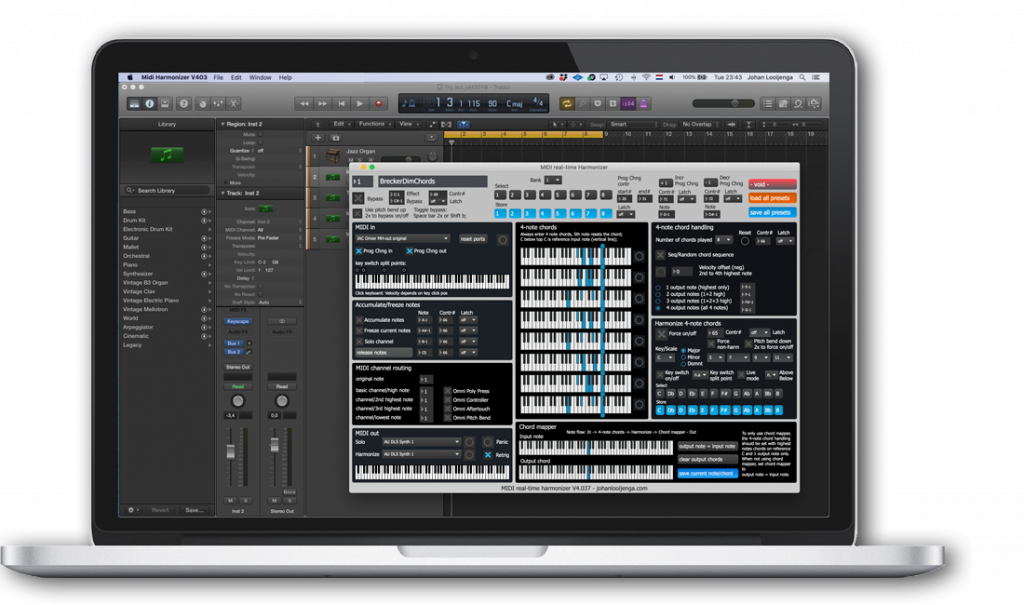
Finally the new version of the MIDI Harmonizer is available. The new MIDI Harmonizer V3 adds a number of new features to the popular V2 software:

  • Several on/off switches can be controlled by programmable MIDI continuous controller messages
  • Harmonizing non-harmonic notes into the selected key/scale
  • Individual 4-note chord notes can be output onto different MIDI Channels

Read more...

Graphical MIDI Monitor released

graphical_midi_monitor

When working with MIDI and programming synth sounds, you now and then need to know what's going on between your MIDI generating controller, like your keyboard, guitar synth, EWI, or pedal controllers, and your (soft) synths. If you need to monitor your MIDI signals there are a number of good applications, however, most of them show raw MIDI message data and numbers rather than easy to read parameters. Besides this, most other monitor applications only monitor MIDI data but do not generate any MIDI data.

So I decided to develop a Graphical MIDI Monitor using Max of Cycling74. The name indeed implies that all MIDI data you put into it is shown in a graphical manner which makes analysis a lot easier. Besides this, the Graphical MIDI Monitor can also generate MIDI messages by simply dragging sliders, dragging numbers and clicking keys. Read more...

MIDI real-time Harmonizer version 3 coming up

MHMIDI

Since the release of version 2 of the MIDI Harmonizer, I got a lot of requests from many users, in particular EWI players. Since then I've been working to include all kinds of new features into the MIDI Harmonizer. During the coming months I will release version 3, which I'm testing at the moment. Apart from a number of new functions and MIDI cc functions, the most exciting to me are the forcing of non-harmonic notes to fit into selected scales as well as the possibility to set the MIDI channel for each individual note in the 4-note harmonized chord. Read more...

A big thumbs up for Dave Smith!

Fortunately, I seldom have problems with my equipment. OK, now and then you'll have the occasional software challenge of getting things working correctly, but I haven't had any serious hardware failures that couldn't be fixed. Once I had one of my voice boards not working on the Rhodes Chroma. The reseller nearby happened to have another Chroma, so I was able to exchange a voice board.

DSI_VoiceBoard_Replace

I recently had a problem with the voice board of my DSI Prophet 08. Voices 3 and 4 were not working. I could tell by looking at the voice LED's not coming on when playing. A week ago I send a mail to DSI and got response the same day. DSI offered to switch voice boards, so after paying $100 they shipped the board to Europe, which I received 3 days later. I opened up the Prophet, exchanged the voice boards, put the top back on again, switched on the Prophet 08, calibrated the filters, and presto! Back on track again, perfect!. When sending back the old voice board $75 will be returned.

What a great service! Indeed a big thumbs up for the people at Dave Smith Instruments! Now I can enjoy one of the best analog synths again. Great!

MIDI real-time Harmonizer version 2 released

I'm proud to announce that version 2 of the MIDI real-time Harmonizer software is available. I had a lot of fun with the MIDI Harmonizer the last couple of months. I think it's a great tool for improvising since you can have the MIDI Harmonizer generate unexpected harmonic additions to your solo, while at the same time you can restrict the harmonics to sound within key/scale and influence this in real-time as you play. An interesting way of inside/outside harmonic playing.

I made a demonstration video of the MIDI Harmonizer version 2. In this video I explain how the MIDI Harmonizer is working. From 7:00 and further, you see a live demo of the MIDI Harmonizer. Note that the live video image is lagging behind a bit to the actual audio. In the MIDI Harmonizer window you can see what's going on while I play a demo tune. I bypass the harmonizer now and then, and also use key switches in the lower part of the keyboard to switch to the right key/scale while I play the solo line.

Go to the downloads menu to have a look at all of it's features and/or buy a copy of the MIDI real-time Harmonizer V2.

Page 1 of 2

  • «
  •  Start 
  •  Prev 
  •  1 
  •  2 
  •  Next 
  •  End 
  • »